
Download Image To PDF – Convert Images to PDF, Free Tool, Utility, Productivity
Overview
Image To PDF is a straightforward, freeware mobile application designed to simplify the process of converting image files into PDF documents. The app addresses a common digital workflow challenge: the need to consolidate multiple photographs or image files into a single, shareable, and printable PDF format. This functionality is especially useful for users who frequently organize personal or professional documents, such as scanned receipts, photo albums, or digital artwork.
The target audience includes students, remote workers, small business owners, and individuals managing digital records. While the developer’s background is not publicly detailed, the app’s focus on simplicity and efficiency suggests a developer prioritizing usability over complexity. Real-world use cases include preparing digital portfolios, archiving event photos, or compiling invoices from image-based receipts.
In the broader app ecosystem, Image To PDF fills a niche gap for lightweight, no-frills conversion tools, offering a reliable alternative to more complex desktop software without requiring a subscription or premium account.
Key Features & Functionality
- Multiple Format Support: The app supports conversion from a wide range of image formats, including JPEG, PNG, and other standard types. This ensures compatibility with most photos and digital images captured on smartphones or sourced from various platforms.
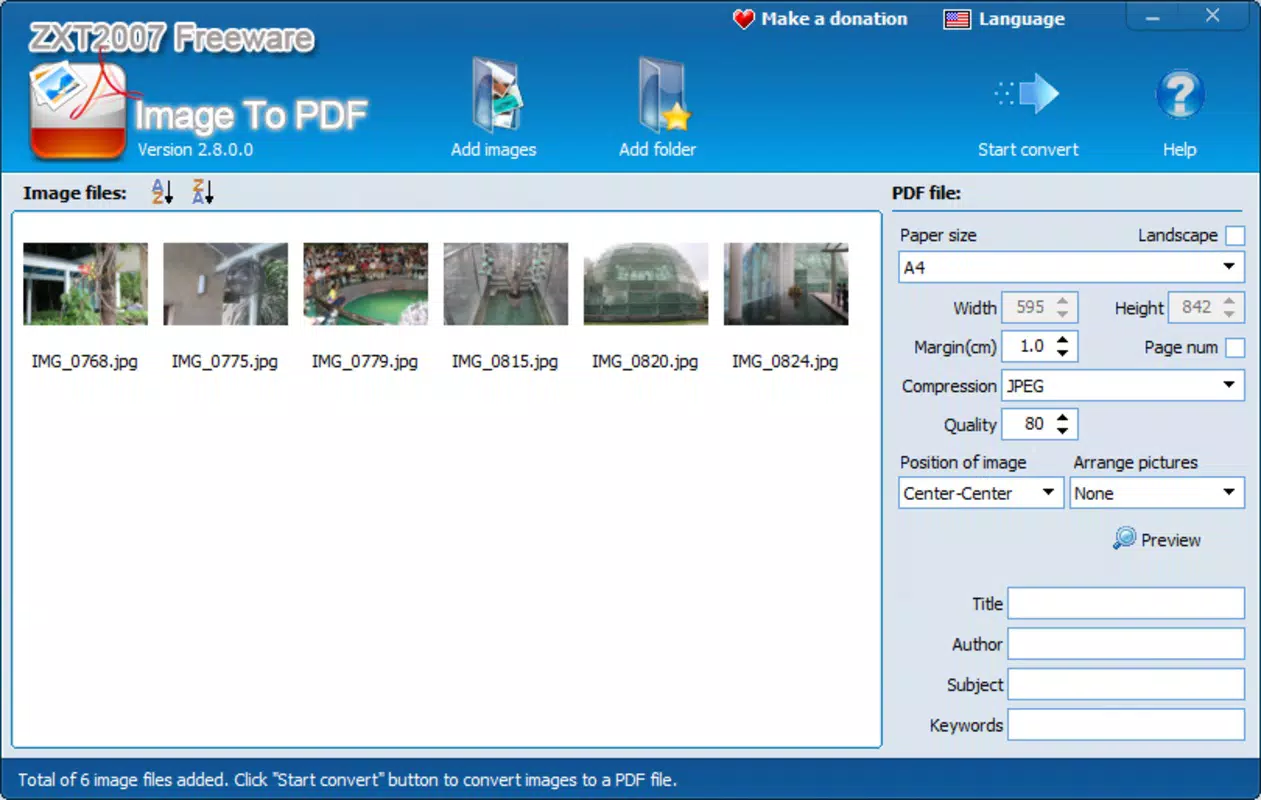
- User-Friendly Interface: Designed with minimalism in mind, the interface allows users to initiate conversions with just a few taps. The layout emphasizes clarity and direct access to core functions, reducing the learning curve for new users.
- Batch Conversion Capability: One of the most practical features is the ability to process entire folders of images at once. This eliminates repetitive manual steps and significantly improves efficiency when handling large sets of photos or documents.
- Multi-Language Availability: The app supports multiple languages, including English, German, French, Italian, Greek, and Japanese. This linguistic inclusivity enhances accessibility for international users and supports diverse digital workflows.
- Free and Ad-Free: As a freeware tool, Image To PDF is available at no cost. There are no in-app purchases, subscriptions, or advertisements, which contributes to a clean and uninterrupted user experience.
For example, a user preparing a digital travel journal can import an entire folder of vacation photos, convert them to a single PDF, and share it with family members without needing advanced software. Similarly, a freelancer managing client invoices stored as image files can batch-convert them into a PDF portfolio for easy submission.
Interface, UX & Performance
The app’s interface is clean and purpose-driven, focusing on core functionality without unnecessary clutter. Navigation is linear and intuitive, guiding users through the conversion process with minimal friction. The visual style prioritizes readability and accessibility, using clear icons and labeled buttons to support seamless interaction.
While the developer did not list formal performance metrics, the app appears optimized for responsiveness across mid-range and high-end mobile devices. Users can expect smooth transitions between selection, processing, and export stages. Stability during batch processing is likely maintained through efficient memory handling, though specific technical details were not disclosed.
The app does not require excessive system resources, suggesting it operates efficiently even on devices with limited storage or processing power. Although the developer did not specify minimum OS requirements or compatibility details, the app’s lightweight design indicates broad device support. Overall, the user experience is consistent with modern mobile standards, emphasizing speed, clarity, and ease of use.
Platform Compatibility & Technical Requirements
Image To PDF is available on Android and iOS platforms, making it accessible to a wide range of smartphone users. The app’s latest version was released on September 26, 2022, and is compatible with current mobile operating systems. The file size is reported as 2.4 MB, indicating a lightweight installation that does not consume significant storage space.
Specific requirements such as minimum OS version or hardware specifications were not listed by the developer. This lack of detail means users should ensure their device meets general system standards for app installation. The app does not require root access or special permissions beyond basic storage access, which aligns with privacy-conscious design principles.
Compatibility with older devices may vary, but the small footprint suggests it could function on a broad range of devices, including entry-level smartphones.
Pros and Cons
Pros
- Simple, intuitive interface ideal for non-technical users
- Supports batch conversion of entire folders for improved efficiency
- Wide compatibility with common image formats
- Available in multiple languages for global accessibility
- Completely free with no ads or in-app purchases
Cons
- Developer did not provide detailed technical specifications
- Specific OS version requirements were not listed
- No cloud integration or export options beyond local storage
- Limited customization for PDF output settings
- No built-in editing or image enhancement tools
FAQ
Is Image To PDF safe to download and use?
Yes, the app is a freeware tool with no reported security risks. It does not require excessive permissions and operates within standard mobile app security protocols.
Can I convert multiple images at once?
Yes, the app supports batch conversion, allowing users to select entire folders of images and convert them into a single PDF file.
Is Image To PDF available for both Android and iOS?
Yes, the app is compatible with both Android and iOS platforms, enabling cross-device accessibility.
Does the app require an internet connection?
No, the conversion process is handled locally on the device. An internet connection is not required for core functionality.
Are there any hidden costs or ads?
No, Image To PDF is completely free to use with no advertisements, in-app purchases, or subscription fees.
Final Thoughts
Image To PDF stands out as a reliable, lightweight utility for users seeking a fast and free way to convert images into PDFs. Its focus on simplicity, batch processing, and multi-language support makes it a practical choice for everyday digital organization. While it lacks advanced editing or cloud features, its core purpose is executed efficiently and without compromise.
The app delivers exceptional value for individuals managing personal records, professionals compiling documentation, or anyone needing to streamline image-to-PDF workflows. For those looking for a secure, no-frills tool that works offline and requires no payment, Image To PDF is a standout option. Download Image To PDF now.


